VLC can easily access media from UPnP (Universal Plug and Play) as well as DLNA (Digital Living Network Alliance). The option is available in the View > Playlist section of the media player. UPnP and DLNA allow you to stream content over your local network. You can see televisions make use of this feature to access videos from your laptops and other devices supporting the standard. It’s like sharing the media content that you have on your computer or phone to other devices without the need to copy and move files. All of them should be connected to the same network or Wi-Fi.
If you have VLC on your computer, you will be accessing the files available via UPnP as well as DLNA. There should be another device sharing media files using this standard or protocol. It’s like a private network for audio and video files.
Here’s how you access media from UPnP or DLNA using VLC:
- Open up VLC Media Player.
- Go to View > Playlist [CTRL + L].
- On the left under Local Network, click on Universal Plug'n'Play.
- You’ll see a list of files or streaming networks listed on the left.
- Browse through them and right click on them to Play, Stream or Add to Playlist.
- You will be playing media from your network in some time.
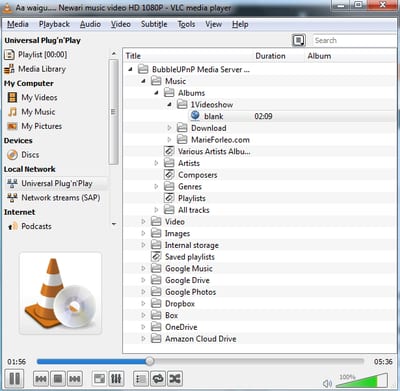
Note: It can take some time for VLC to discover and list all the folders and sub-folders from your UPnP and DLNA servers.
This does not apply to the Android app.
It does apply. I am using it on my android TV box connected to a network and streaming from my Mac Mini using Universal Media Server.
How do we do this on android or fire tv?
Is DLNA/UPNP support planned for VLC on Android?
What versions of VLC does this apply to? I have the latest on my Mac but I have never seen my server in the UPnP list, nothing there at all. I have the latest on my Ubuntu desktop, but again nothing shows up under UPnP. No UPnP on Android, so at least there I am sitting waiting for nothing to happen. Maybe VLC UPnP works on Windows, but I don't use Windows and if I did I'd use the free UPnP client that Microsoft provides. My TV has a DLNA client so I know the server works. The problems with Mac and Linux VLC UPnP are not new, it's been years since I've seen it work, and I have seen it work, just not in a very long time.
The Mac UPnP issue is due to a hardcoded reference to a network capture in vlc that no longer works; It's fixed in the next version (3.0.7).
Not fixed for me
upnp and dlna only work in theory, not in the real world never seen any of it work on any harware/software my nas is supposed to support samba and ftp and dlna: vlc can find nothing. so many ways to fail at basic task of allowing access to files over a network. Zeroconf, plays for sure, plug and play, dhcp, samba, upnp. all a complete joke. 2019 and still no amount of money can buy a computer that actually works properly
VLC in Android works smoother when browsing DLNA server. I am using LibreELEC enabled with DLNA.
I can see the DLNA server on my iPhone VLC but nothing show up on my Linux Mint VLC. :-(
Yes, it's a bit ridiculous that this isn't working on Linux properly. I can even see my DLNA server on my PS3 and that's crap for almost everything.
On Ubuntu 16.04 read https://askubuntu.com/questions/799747/vlc-not-finding-any-upnp-devices sudo dpkg -i libupnp6_1.6.19+git20160116-1_amd64.deb You can browse upnp network from VLC 2 but not VLC 3. On VLC 2 rc the video and click on info. Copy the url. On VLC 3 open an url and paste the URL copied from VLC 2. You can play the video and you can render on Google Chromcast (what I did).
I cant push a simple audio file to my DLNA Smart TV and i thought WMP was bad!!!!!!!!! Was looking for a media player that would allow access to the the pc as a server since windows 10 has apparently done away with it. I can at least push it to the TV with WMP but cant make VLC do anything. Didn't know i needed a Phd from MIT in computer science to push a simple audio file geeesh.
It's not working on Windows: I tried DLAN on a Synology Disk Station and minidlna on a Raspberry Pi. Both Servers are recognized on an old LG Smart TV and VLC on Android. The VLC Windows Version (currently 3.0.8) doesn't find anything when choosing UPNP like in the manual above. Same Home Network, WiWi or Cable connected. I even tried on Windows 7 and 10, different Computers... nothing. Any suggestion?
Use VLC 2.0.8 version or Windows Media Player.
Works here with minidlna. You have something wrong with ur DLNA.
I have the same problem VLC 3.0.8 on Mac recognizes Raspberry Pi-based DLNA server, but VLC 3.0.8 on both Windows 7 and Windows 10 does not.
It is hidden. Go to reproduction list and then will appear a mouse drag cursor to you move to below and above. It's like a window that needs to be redrag. Move very slowly your mouse from above to below inside the reproduction list screen . It's not an error or missing feature. It's just hidden. I was looking for this has several months and it was very strange the same program in other computer show and others not. It's just hidden and we cant see since we dont know it is there. Just need to "open" the window
OK I'm really really dumb. What is a "reproduction list" and where do I find it?
I am using VLC on Apple TV and had no trouble streaming on Kingston media server. However, I recently changed over to WD My Cloud Home (Single bay) backup server and it is not able to detect any files/folders beyond the “Public” folder. Please help
Were you able to figure this out?
Go into the UI on the My Cloud device and make sure each "share" has Media Serving enabled.
Hey guys just figured out that this menu is hidden, If you go with your mouse below the reproduction list it will enable a mouse cursor drag. Then you will be able to open the window and all is there.
If you were looking for How to Access Media from UPnP or DLNA using VLC Android, this information does not apply. VLC Android uses SMB. It does not support DLNA.
Not so. Your DLNA servers should show up under local network. You may have to swipe left to view them. It does for me.
VLC for Android does work with DLNA. Your servers will show up under local network. You may have to swipe left for them to display.
it does i have had it running, you just have to browse through the folders to get the media