VLC Media Player is best for not only playing videos from different sources but it can be used as a video editing software. You can cut or trim any videos to create video clips. That means you can select a certain part of your video and cut it out to a smaller clip. You can easily select a beginning point and then an ending point. Then, VLC will automatically cut and save from point A to point B to your PC.
VLC might not be the most advanced video editing software but it can easily cut videos. Advanced video software requires advanced skills to perform even basic tasks like trimming a video. But VLC is simple enough to allow you to trim parts of your videos. You will never have to keep a lengthy video file because of some clips in the video that you really don’t want to delete. Just save your favorite segments and leave out the rest. This will also allow you to easily share videos with friends and family via different mediums.
To cut parts of a video using VLC Media Player:
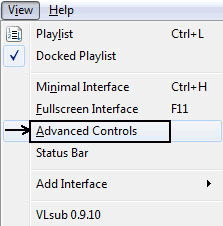
- From your normal VLC screen, using the menu bar go to View > Advanced Controls.
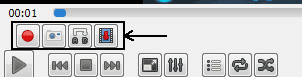
- Recording buttons will appear above your normal player control buttons.
- Open up your video that you are looking to cut.
- Play the video or scroll around to the starting point from where you want to trim.
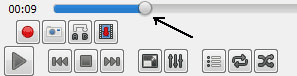
- At the starting point click on the record button. It is the round red button.

- Play the video or move it frame by frame using the "Frame by Frame" button for more accuracy.

- After you reach the ending point, hit the record button again.
Another way to extract clips from videos is by using shortcut keys or hotkeys.
- To begin recording: Press Shift + R
- To stop recording: Press Shift + R again.
Your trimmed video will be saved in your “My Videos” folder in Windows. In Win 7 it is found under C:\Users\Username\Videos folder if Windows is installed in C: drive. For other OS just visit your documents folder or your user folder and find the default videos folder. You will easily find your edited video there. File names can be something like vlc-record-2013-11-16-14h25m16s-vlc-streaming-audio.avi-.avi if you need to search for it. <img src=“/images/2016/11/recorded-file.png” alt=“recorded-file” / loading=“lazy” decoding=“async”>
Unfortunately it doesn't seem to work very well, in some cases it records only the sound, in others the image is idle in the first seconds
I have similar issue on VLC. It records the sound on MP3 format and no video. Have you figured out how to record?
Whenever I tried to do this it desynced my audio
Thanks brother, but when i cut any video so i get first thats audio and after playing audio then play video. I mean if i cut 10 sec a video so that done but when i play so first play audio of 10 sec and after playing audio play video of 10 sec. Please send its solution. Thanks
in my vlc there is no view option
this is recording which i know but how to cut part of video like any scam or sexy part from movie using VLC player or in any player or with any resource.
Try using the same method.
how do you include subtitles in cropping the video using vlc?
Since the subtitles aren't hard coded with the video file, they cannot be included in the cropped output.
I don't have an "Advanced Controls" option under View on my Mac. Is this another case of our being considered second class citizens? Shame.
i have been trimming videos for a while using vlc and it works really well however a avi file that i trimmed today had no sound. why would this be?
Hi, I'm having the same problem. Did you find a solution? Thaks, best
i am having the same problem. I thought this was because I was running VLC on my mac so I have now tried running it on a VISTA Windows machine and get the same problem. THe file extension is .AVI-.wav in case that helps get someone to figure out why it doesn't work.
I don't get the same interface. There is no option for 'advanced controls', I'm using a mac. Does this make a difference?
Nope, on PC is the same story!
Work very well for me, thanks !
Why would an otherwise fine video player make it so difficult to do such a basic task?
You answered your question within your question, it's a video PLAYER not a video EDITOR. I don't understand why people keep wondering this about the great , and free mind you, VLC video PLAYER not having good video EDITING features. I postulate this: Why would an otherwise fine screwdriver make it so difficult to pound in a nail? Because it's not the right tool for the job. Can you pound nails with a screwdriver? Sure, but not very effectively. The better question is "why don't you use a hammer?" Use the right tool for the job at hand and your life will be so much easier. Work smarter not harder. Peace.
You did a superb job of explaining "how to" here, even dumbed it down enough for us average Joes to understand. Just reading through a few of these questions, and comments, and then seeing this little "HELLOOO PEOPLE???" comment made me feel the need to commend you on your patience, and thank you for continueing to help out, regardless of the ignorant/arrogant/spoiled individuals that are blind to how awesome this player is for the cost..**FREE!!!** I would bet that many of these individuals have enjoyed much use from this player, after skipping right passed the "donate" button! Again, thank you so much for your time, and help. You can't please em all, but rest assured, you are very appreciated by the majority for your sevice, and even more so by me, for not becoming discuraged, and giving up..You rock!! Good day.
Dear Admin: I also have the same issue as all my friends who posted comments here, esp on the lagging part. It's true that you are a video player and not a video editor but think about something lady/mister, you are SO NEAR that basic little perfect video editor, esp JUST, JUST to resolve that video lagging part. For examole, many of my files are in flv format, the lagging is all it remains to resolve so many issues here. Youj are so near to finish it. just the lagging, please. Thank you for letting me post this ocmment Best Regards Wb
Whether it is possible to get a pause in between the cut video. I mean to say, I want to record from A to D and in between A to D I want that B to C is not recorded. There should be single video from A to D leaving B to C in between.
It's nice that VLC is actually capable of doing this, but it *is* very clunky. If I want to trim say 15 seconds off the beginning of a 20 minute video, I still have to let it play out for 19m45s as there appears to be no way to immediately scrub to the end of the clip. Not very practical...
This is not an appropriate solution that they have provided. If you want to cut multiple sections of a video. You should be able to select all those points using a new VLC interface and then export those time points to a zero frame lossless editor that makes the cuts in seconds - DONE! Ideally VLC could implement zero frame lossless cutting!
Yeah it's about what I've come to expect. Many "added features" in VLC are cumbersome and "twitchy." It works fair as a basic player that doesn't hog resources, and its desktop-recording feature isn't bad, but many of the functions are just plain clumsy. (...and still no screen-click pause after all these years, not since last I checked.)
This should not be the only solution here, and I don't see any reason not to simply let us crop the length. I'm trying to make a gif that needs millisecond accuracy on its start/end times, and it is less than 2 seconds long as well. But even when it seemed like I hit it precisely at the right marks, I end up with a 0 second long pitch black video, so I'm assuming that it was too short to count as one or... something. What's the deal here? Is there a reason I can't just say, "here's the start time, here's the end time, delete everything that is outside of these parameters or whatever"?
It works as described; unfortunately it can't be played in Windows Media player or IrfanView. Not everybody has VLCMediaPlayer.
How could it work as described yet one not have VLC? This method uses VLC to do the action stated. If it worked as described a proper mp4 WOULD play on any standard player. Plus there's no reason not to have VLC, it's free and multi-platform. I have the same issue as many others I get an unplayable black screen that attempts to play for about a second. Interestingly, even though the clip is about 3 seconds the timecode is always wrong when I try to play the resulting file. It might say 4 hours it might say 10 min. It's always different each time I encode. This function seems to be broke.
I want to perform a very simple task i.e. assuming that I have a video from A to Z lasting totally 5 min. I want to crop a section B to C lasting 30sec and then further down another section D to E lasting 45sec and then one more section K to L that lasts 45 sec. That means I want to keep the video A to Z without the sections B to C and D to E and K to L, thus the new video will have a duration of 3 min. How can I do that in a simple and quick way??
VLC isn't that feature rich for such video editing but a simple video editing tool will be able to do what you are trying to achieve here.
Perhaps you want video editing software of which there many out there. This a video player, though full featured, a video player none the less.
thanx a lot
here's the strange thing about my situation. i edited two videos successfully. got the edited parts in both video and sound. but then on the 3rd and thereafter, all i get is a black screen and audio. i did not change anything after that, and even tried return preference to default. still i get black vid and good audio. how do i get the video to work???
Did you try editing the videos that you were successful with to see whether you get the same result?
yes.thanks a lot
Dear Admin, please I can't find the record button on my VLC media player. What should I do?
If the record button doesn't show up after you activate the View > Advanced Controls then you might have to edit the layout and customize the VLC Interface using the guide here.
I wish it was as easy as it shows in that video (lol) But for some unknown reason the webm file that i try an convert gets changed to MKV and then wont play in VLC if anyone has some advice as to how this could be resolved that would be awesome. I shall in the meantime continue searching for a solution.
Same problem, I was able to crop the video but there is no image just a black screen and sound on the cropped video
What version of VLC is this? At some point VideoLan cut this bit out.....ironic, lol.
No, it's still there...I'm using 3.0.6
Wow this was so easy ... Got it right the first time ... Shortened a 60 minute video which I only needed the first 03:30 minutes .. Went to my Video Files ,.. and for sure it was lying there and waiting for me ... Thanx
All I wanted to do was trim a second or two out of the original clip. I cannot seem to do this. I can extract portions of a clip to make new clips, but I cannot trim a clip. Clumsy.
Hi. Just cut the end off a video for the first time. It works great. BUT, when the new video ends, it shoots right back into my video file so all my videos are listed (and playable). How do I stop that happening. If i send the video to someone or share it on Facebook I don't want them to see all my other videos.
So, you are saying it is opening up other video files? Maybe you can try putting the one that you are trying to share on a separate folder?
in the settings you can specify somewhere that it should stop playing on the very last frame and pause there instead of ending the video.
yooo this worked perfectly, thank you so much!
Where on macOS version is this control?
cmd
I can't find it either. WTF? Should VLC be the same on all platforms?
Thank you.
Thanks so much! This worked just fine!
Yes it works .... but ..... during this DVD playback I did the record thing ......... but ......on playing that segment, the sound and video were disconnected. Is there a bug.fix?
Hello! A couple of years ago, I could cut videos perfectly with VLC, but now the result is a video trimmed without sound. What is the problem? It happens to someone else? I have the latest version installed (in Windows 10). Thank you very much, Sergei
Same thing just happened to me. Windows 7.
Same thing with latest VLC. When playing AVI file from disk and trying to cut video, an AVI file is created without sound :(
VLC is just the best thing. Thanks and congratulations for making this useful program that helped me a lot in these 10 years of use.
My controls are not operating this way. I have been trying to find a way to ask the forum for help and there is not an obvious way. Not sure I can agree this is awesome
Make sure to check the "customize interface" under tools and to place the buttons you want into the interface. A youtube video of using this would be desireable.
It's definitely not awesome. The UI is awful, this feature is awful. The A-B loop feature is awful. Clearly people want to trim a video - set a start and end point and clip out the rest. How is this not a simple use-case and easy feature to implement. But we're stuck with this godawful user experience.
This is a fantastic facility, BUT there is a problem! If the video comes to an end, or if the user quits VLC, before the RECORD button is pressed to complete the recording, the resulting vlc-*.-wmv.asf file that is placed by the vlc app into the videos folder cannot then be renamed, deleted, moved and ultimately completely cocks up Windows Explorer app. The only way to get rid of it that I have found is to boot into Safe mode, and delete it that way.
i am glad to know that i hate when i try to play asf files it lock up my putere and i have to start it up again i tried many ways to remove then thanks,,, so you say sate mode and then delete right i wonder how i got them in the first place
Download the video quality improvement program for free You will not face any challenges when optimizing your videos on a mobile device. There are a number of apps that you can use that are fully supported by these devices. The success of your video optimization task largely depends on the type of application you have chosen. Make sure that the app you choose is well compatible with your mobile device for compatibility reasons.
I was able to use this feature. Unfortunately, the clip it created leaves off many seconds of the video! I have tried it multiple times. The video is in MP4 format, so this may be an issue of VLC waiting for the next full frame in the content.
Same here! Every time I've tried to create a clip, for the first 6 to 11 seconds I get no picture at all, only sound. And I've adhered strictly to the instructions, multiple times! Really hope this will be fixed.
Hi, I used to meet the same error and got it addressed by converting to H.264 MP4. Did you check the format of your clip? Some codec can't be read properly by VLC.
worked for me but had to wait 7 mins. & 55 secs. from a 8 min. video. Just to trim a vid.
lol ya same
Sounded like a good idea, but not really. My video is 63 minutes long and what I want to trim is at the end so...not waiting around for hour for that.
Just click and drag the "fuel gauge" marker to go to the spot you wish. Works on YouTube, too.
Hi there what is the "fuel gauge" marker?
Using 3.0.6 just installed, I successfully extracted a 2 min segment of a mp4 video with successful video and sound synchronization and had the extract saved to the Video folder where the original video resided on a W10 64 bit operating system. Used the start and stop controls from the Advanced Controls Menu under View. Worked as stated.
So what I "record" using VLC is what I 'm left with, not the original video minus the clip I want to remove?
The original video is unchanged. You're just taking 'recordings' of sections of the video.
Thanks broo, really helpful
Often get not audio. All in all, it's a disgrace that humanity still hasn't invented good editing software of any kind, so that cheap workarounds wouldn't even be necessary... Because everyone is such a poser, they can't bother to make a clear and logical interface, that's all there is to it. Including not speaking about these things, to keep the idea intact of the privilege and elitism of dealing with badly designed and thought-out things.
Have you, I don't know, tried Vegas Pro or Adobe Premier Pro? Saying there's no "good editing software of any kind" is utter stupidity.
it's not that serious bro lol
Thanks very much it worked a treat
This is effectively useless, as it cuts nowhere near where I choose. Surely this can be fixed, as Quicktime does it perfectly, but I prefer VLC for so many other reasons.
Please check your time frame, maybe that's the reason for your experience. It works always perfect for me. Cheers
trimmed video cannot play, because the size only 677 bytes. VLC on Linux
Thank you for your video instructions - just did not know where to dig it out - only after watching the video - I found it, thank you
When I go to view, I do not get advanced controls, so unable to trim although I just upgraded to the latest version of VLC which is 3.0.8. What can I do? When I press on view, the drop down menu shows the following titles: Hide Tab Bar Show Previous & Next Buttons Show Audio Effects Buttons Show Sidebar Playlist Table Columns Thx for helping out
It looks like this for me. . What is your operating system?
I have the same problem. Under "view" I don't get "advanced controls." I'm running a macbook air under OS 10. So that is probably the issue, I'm guessing. Bummer.
I solved it. Go to "playback" and under that, select "record."
The option seems to be available only for Windows users.
Hi Go Back to VLC 3,0,6 & there it is under View..good luck
I cannot get this to work, it only records the audio and not the images. What do I have to do to make it work?
I'm afraid this doesn't work. I'm trying to record a scene and it only records the audio and tosses me this: "Codec not supported: VLC could not decode the format "WMV3" (Windows Media Video 9)" I already looked for the codec and installed it. It still doesn't let me record both audio and image, which didn't happen before. Help, please!
hi Download - K-Lite Codex Pack
I love VLC and have used it for years. i appreciate it's free and works so well but could you please just add a crop button so I don't have to watch the whole video to do this ? Also can you ask me where to save it so it's on my desktop instead ?
There is a crop feature under Tool > Effects and Filters > Video Effects > Crop
No, the poster was not talking about the crop the scene or picture. He or she just wanted to cut the video without actually watching the whole video again. Say I want to cut a video 00:05:00 to 1:05:00 out of a two hour long video. I know the starting point and ending point. I don't want to watch the video for another hour to hit the recording button again to cut it.
I get it. Yeah, unfortunately, VLC cuts video like this. Sad for us we have to wait an hour to cut an hour scene out of a video.
I made yopu a question and you haven't replied after more than a week. I'll repost it here: I’m trying to record a scene and it only records the audio and tosses me this: “Codec not supported: VLC could not decode the format “WMV3″ (Windows Media Video 9)” I already looked for the codec and installed it. It still doesn’t let me record both audio and image, which didn’t happen before. Help, please!
There are other video editors out there that can do what you need. VLC is great but it doesn't really have editing tools.
I just tried the following (because I'm relatively computer illiterate) I FF to where I wanted my new start to be--hit play/then the record button and then dragged the progress bar to where I knew the new end point would be in the video and hit the record button again to stop it...it worked. p.s. I first made a copy of the original video in case I was going to screw it up and worked off the copy. If I can do it it has to be possible for others...just always make a copy of the original first.
My mouse drags the progress button to where I want to start, I hit record, and then when I drag the progress button on either the top progress bar or the colored in progress bar, it won't stay where I put it in time for me to click on record stop. How do you keep it at the chosen end point?
This site isn't run by VLC..
This might sound stupid but do something else while it's running? As you say it's free and we're lucky to have such a versatile tool to use. If you want full functionality then you can pay for it elsewhere. Sorry if that sounds a little confrontational, it's not meant to be!
If you're doing something else, how will you stop it at the right time?
Yeah, I guess one has to give attention to the video. The cutting videos feature in VLC isn't really that of a professional tool.
Good point, well made :) You could set an alarm or timer on your phone/computer so that you know when to go back to VLC to stop the recording.
These forums drive me nuts... endless comments about it either "works for me" or "audio but no video" (my problem) and zero insight into a solution. Waste of typing and reading
Then stay off of them if *you* have nothing to contribute. I happened to get the answer I was looking for. Sucks to be you, I reckon.
Steward Wood is correct. Don't be an a* to him. This is supposed to be the place where you get answers...
download k-lite codec pack
exactly your comment here
Seems I am having the same problems as mentioned above.. my edited videos are only saving as audio, no video. I have the latest version installed.
Thanks Man, Worked Perfectly for Clipping my Game Recordings. Thanks Again for Sharing
thankyou alot but subtitles were not included in the recorded video.. how can subtitles be included in recorded video plz any one know this! regards!
Hello, I'm having a problem. When I record the result should have the same format of the origin but it doesn't work. The origin is a video in .AVI in 1080P and the result will be in 720P. How to get the resolution?
This is the best video cutter for any video. I use this video cutter always for cutting any mp3 or mp4 format.
plzz tell how to crop video through vlc media player
By crop, if you mean cropping a video like photo, then I don't see it to be possible. We can only cut and extract sections of a video if we're lucky.
Hello, why when I trim a video (R and Shift+R) that is 1080P the saved file instead will be 720P?
Cropping a video with VLC is possible! There is a croppadd filter you can use to do so.
I stand corrected. croppadd filter can be used to crop videos in VLC using the command line.
Each time I record from the beginning to end, 5 seconds of the video I started recording always cuts off. Is there anyway to fix that problem?
I have the same issue
Using VLC 3.0.11.1 on macOS High Sierra 10.13.6. There is no Advanced Controls command that I can find, although I do see a Record command in the Playback menu (cmd+opt+R). That command does *not* appear to be a toggle; IOW once selecting the command, selecting it again does not turn it off. Does this procedure even work on macOS? If so, is it the same procedure? How do I turn recording *off*? If I speed up playback, does the recording come through sped up? Or is this a convenient way to move quickly through a long video segment I want to extract? Thanks.
yes, if you speed up the video, the recorded video would be a fast-forward one.
I have the same issue; these instructions appear to only apply to the Windows version of VLC. The Mac version does not have the controls they instruct us to use. That's weird; I always thought VLC was fully cross-platform, but apparently not. Hey, VLC team: Please port all functions to all platforms.
1. NO AUDIO 2. NO SUBTITLES PLEASE CHECK
I also get no audio.
Yep I did this and no audio too.
Thank you very much, it worked fine!!
Thank you for your video, it is all clear, it worked perfectly! I would like also to ask if there is a way to create a unique new video file from different parts of the original file. Thank you very much!
I do not think that VLC allows combining of the video files.
To combine video clips, try using OpenShot (it's freeware in its basic config) & then size-optimizing using Handbrake (also freeware).
Worked perfectly fine for me, cheers.
This process worked for me. However, on some videos where I trimmed off the beginning, I had a small problem. When I play the trimmed video, there is about 2 seconds of black screen at the beginning. The audio still plays as normal. I am using VLC to convert the .ts trimmed file back to MP4. Then playing that MP4. I don't know if that conversion process is where the problem is introduced.
Excellent ! it worked very well. Thank you.
Thanks for this article. These steps were easy to follow, and the process was perfectly explained. Your trick for finding the recording afterward worked as well.
OMG so frustrating! I just spent an hour and 15 minutes TRYING FOUR times to get it to START the recording at 16 seconds in, it chose 35 seconds in, cutting out crucial information. Stops at the correct point. the ONE time it DID choose to record at almost the correct starting point it was ONLY AUDIO! I did the SAME PROCESS EVERY TIME! play video Clicked Shift-R to start Recording... Record shows up on screen. I Play through to the stopping point and Click Shift-R to stop. What am I missing here?
OMG thank you!
So, does this mean if I want to cut 2 minutes of a 62-minute video, I literally must let it play for the entire 60 minutes? There is no way to "snip" part of it off immediately?
Haha yep
No. Just go directly to the part you want to cut, then press the record button until you get to the end you want the cut to include last lol
Did you ever use a VCR or a VCD or a DVD player? Did you sit through the entire tape or disk to jump to the point that you wished to watch? FF i.e. Fast Forward, you "smart person"! The most essential ingredient to doing what you want to do is: Using Your Brain!
If you click fast forward, the recording will be in fast forward Mr Smarty Pants.
It does not save the recording anywhere.
it saves it under This pc > Videos
Sorry, but there are no clippings under Videos.
This only works on Windows. Start -> cmd then double left click on cmd.exe and do something liked this: Microsoft Windows [Version 6.1.7601] Copyright (c) 2009 Microsoft Corporation. All rights reserved. C:\Users\user>dir c:\vlc-record*.* /s Volume in drive C is hitachi Volume Serial Number is 7E47-26AE Directory of c:\Users\user\Videos 31/07/2017 21:57 11,813,025 vlc-record-2017-07-31-21h57m36s-dvd____D__-. mpg 31/07/2017 22:42 26,432,145 vlc-record-2017-07-31-22h42m14s-dvd____D__-. mpg 31/07/2017 22:46 44,778,654 vlc-record-2017-07-31-22h45m37s-dvd____D__-. mpg 31/07/2017 23:20 22,535,502 vlc-record-2017-07-31-23h19m51s-dvd____D__-. mpg 01/08/2017 00:14 42,374,350 vlc-record-2017-08-01-00h13m09s-dvd____D__-. mpg 01/08/2017 00:25 31,074,301 vlc-record-2017-08-01-00h25m15s-dvd____D__-. mpg 01/08/2017 13:33 24,158,967 vlc-record-2017-08-01-13h32m30s-dvd____D__-. mpg 01/08/2017 13:55 31,481,064 vlc-record-2017-08-01-13h54m17s-dvd____D__-. mpg 01/08/2017 19:07 29,865,623 vlc-record-2017-08-01-19h06m40s-dvd____D__-. mpg 01/08/2017 19:11 20,730,025 vlc-record-2017-08-01-19h10m49s-dvd____D__-. mpg 01/08/2017 19:20 31,887,758 vlc-record-2017-08-01-19h19m48s-dvd____D__-. mpg 01/08/2017 22:17 44,134,069 vlc-record-2017-08-01-22h15m52s-dvd____D__-. mpg 01/09/2017 17:57 1,780,734 vlc-record-2017-09-01-17h57m09s-14m shc to h ome.3gp-.mp4 31/10/2018 22:16 455,151 vlc-record-2018-10-31-22h16m01s-A556_685_60_ Minutes_AustraLia_Dirty_Secret.mp4-.mp4 30/07/2019 13:39 361,689 vlc-record-2019-07-30-13h39m43s-C4E3_935_KoL anji_TraiLer_Samuthirakani_Sanghavi_Rajaji_Naina_Sarwar_Naveen_M_Natarajan_Sanka ran.mp4-.mp4 04/01/2020 11:49 26,526,873 vlc-record-2020-01-04-11h41m52s-E3D9_256_Fat _Buddies.mp4-.mp4 21/07/2020 04:50 597,316 vlc-record-2020-07-21-04h50m20s-Indira’s rui nous economic decision that Modi hasn’t dared reverse, & an unresolved bank-spy scandal-.mp4 17 File(s) 390,987,246 bytes C:\Users\user>
no files found
If you have a d drive, try dir d:\vlc-record*.* /s ... and onward. Another trick is to play a large video{more than 1GB} and record it then use windows explorer{magnifying glass icon} to search for files beyond 1GB. You can also do this with a small video after midnight and use windows explorer search for files modified after a certain date. I have no further tricks.
My example only searches the C: drive. Have you tried the rest? This is my last trick. Wait until midnight. Play some video. Record then stop. Open windows explorer. Use the magnifying glass icon and search for files modified by date. If you still get nothing then the recording didn't work.
What a colossal waste of two hours. There are no indications that it's actually doing anything, and when the video ended and I click the record button again nothing happened except the video stopped and once in a while I could hear the audio trying to play, even after I close the app. The video file it left behind is unplayable. VLC is unusable for anything, not even playback since it puts a white haze over the image.
oh, it actually worked pretty well for me
works firs try for me 2
Hey Mr! Don't blame your ineptitude on the performance of the software. Learn to read the instructions, Understand what will happen, and Follow it accurately. Don't be a moron. I'll bet a million Turkish lire (which I don't have, lol) that you did NOT set the path where VLC should save the recording, and instead, just mindlessly clicked through the dialogue ending up OVERWRITING your SOURCE video! No software, no system, device, machine, robot or anything, can accommodate stupidity. Unfortunately.
Nor can civility accommodate prickery. A real person of common sense would have given patient suggestion. I find most of the assholes that put others down, especially while using pseudonyms, are covering up for their own inabilities. And cowardice.
Nor can pomposity accommodate knowledge. Nothing less than a narcissistic feels the need to attack a defender of this software for accurately defining the idiocy of a user with low illiteracy. Your need pompous pretense for civility is clearly a (failed) attempt to self-elevate. Thankfully -- it's transparent.
Reread your comment and tell me it can't be applied to yourself as well. Try typing with less prolixity; you communicate like a freshman in college.
Socrates. LOL. You write like a spambot. Proof once again that only a true idiot calls himself Socrates. You're trying so hard to sound intelligent. It's actually quite funny. Thanks for the laugh. ;)
You are being very unpleasant in calling the poster a moron and using aggressive language. Learn to control yourself better, please.
Even though I start the video at the beginning the recording keeps cutting off the first second
That's why VLC is such a mediocre software. Try trimming a video with Quicktime you'll see the difference. VLC is a nice side movie player when other things don't work, but what a disgustingly crappy software for everything else, especially doing very basic edits and saving them as such.
It's a video *player*, not a video *editor*. It's quite capable of doing what it's supposed to do.
Excellent. Worked like a charm!
Waste of time! It cuts so much approximately that it is unusable.
I'm recording part of an .mp4 file. But the recording is saved as a .ts file. Then when I try to use VLC to convert the .ts file to mp4, I get an error message saying VLC can't open the file it just produced. Ridiculous!
To make a clip, I pause the source-video where I want the clip to start, then click on Record and un-pause the video. When it gets to the end-point, I pause it again and click on Record again to stop the recording-process. There is no risk of accidentally overwriting the source file, since each clip initially has a unique name generated by VLC. For greater precision, I suppose that you could make the clip a little long and trim it with an editor. In Kubuntu 20.04, the clips were stored in the Home//Downloads directory until I changed the destination-directory, as follows (which might vary depending on VLC-version): Click on Tools, then Preferences, then find Show Settings in the bottom left-hand corner of the Preferences window and select Simple. In the resulting window, select Input/Codecs, and in the resulting window, go to the Files section, click on Browse, and select the destination for the recordings.
Thank you for this more recent How To!
I'll add that I needed to restart VLC for the folder location to take effect.
This is a ridiculous way to do it. If I want to save 10min of a 30 min video I have to let it play for 10min and be there at the end to stop recording?
Just use Convert (ctrl+r), tick show more options, set start time and stop time, select format as you wish, for best results just choose keep original audio/video tracks and done.
By far the best answer
Such a timesaver for cutting off extraneous footage at the beginning and end of a recording - thanks :)
BEST ANSWER. Who the hell is going to SIT AND PLAY A 3O MINUTE VIDEO JUST TO EXTRACT IT OUT OF A 3 HOUR ONE ? THE POST IS DUMB AF. THIS ANSWER SHOULD BE VOTED TO THE TOP. IN FACT, REMOVE THE POST AND PUT THIS ANSWER AS THE POST.
Very helpful. Thanks!
Thankyou... all these sites which give answers and information which are useless - yours was exactly what was needed.
Indeed, this should be the pinned answer, or even replace the whole original turtorial. It's simple and quick. I'll add that the UI widgets do not seem to let you set the start/stop times longer than 59 minutes and 59 seconds, but it is easily circumvented by specifying the amount of seconds in the command window below.
This option is not working for me. Only captures audio for some reason. And I don't see an option for keeping original audio/video tracks.
Thanks, very clever way to trim vídeos by time.
Yes, thank you so much Arketeer!!! You win!
Noting the issues listed, I have them depending on the file type/version. My easiest route is Record > Record and try and get it at least ten seconds in a single try. That file is then small enough to work with in other programs/upload to online editors to clean it up how you want it. Usually this will pump out a useable clip as opposed to audio only, messed up sync, so on. The more precise I try and get (remember it's not a precision program nor meant for pro editing) the more I encounter the issues listed here.
Thank you for your help was very well explained :)
How about this: Instead of copying a clip of a recording remove the end of the video. For example, I have video that is 38 minutes long but I need to remove the last eight minutes. It's the inverse of copying the first 30 minutes, right? Can VLC find minute 38:00... and the end of the video? fwiw...Bob
I cannot find the recorded video path. Where is it? Because in c:\Users\My-Name\Videos\ is not video, any folder with vlc. So how can I find where I record the video? In settings I cannot find the option of Path / download...
So if I want to trim a video, I go to the spot where I want the trim to start, then hit record and wait the entire length of what I want for the final clip, then hit record again at just the right time to end the clip which obviously doesn't work well, so I have to do the FRAME-BY-FRAME to get a decent end point? When you save it, there's no indication you did, it goes to the Videos folder instead of the same folder as the original file, and the file name itself is ridiculous. In the words of the tutorial, "File names can be something like vlc-record-2013-11-16-14h25m16s-vlc-streaming-audio.avi-.avi if you need to search for it." How is that helpful if I want to search for it? Why not just add a (1) to the original filename like most programs do? I am now using Photos to view videos instead. PHOTOS. The free picture viewer that came with my computer seven years ago. Guess what it has? The ability to click on a start and end point in the video and drag them to my liking, showing what's on screen as I do so. It also isn't in light mode, which is a huge improvement. I'm tired of people releasing low quality products and then trying to gaslight their users into thinking there's nothing wrong with them. I also saw a lot of talking down to people who had legitimate issues here, which is disgusting, and the main reason that I'm writing all of this instead of just uninstalling and moving on. Beyond the bad design and the elitist representatives / fanboys, there are horrible security risks which include "a critical-severity bug that allows for RCE (remote code execution) which potentially allows attackers to install, modify, or run software without authorization." Do you think India banned VLC for no reason at all? A report by Symantec shows that hackers are using VLC media player to launch malware on people's computers on a huge scale (!) In conclusion, please uninstall this program. There are so many better free options that are only a google search away. Thank you for standing up to them. You all deserve better.