One of the cool features about VLC for Android is the ability for you to choose the interface and make it dark or light according to your preference. The options allow you to switch to a dark mode that’s on all the time and there’s also a day and night mode. The day and night mode switches between light and dark themes automatically, depending on the time. It’s a great feature if you are using this player around the clock. Night owls will find it useful when they’re using the app during night time.
Enable the Black Theme
To enable the black theme for VLC's interface:- Tap on the hamburger ☰ Menu
- Go to Settings
- Tap on Interface present under Extra Settings
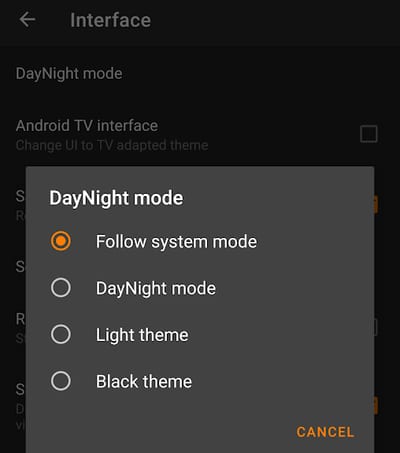
- Go to DayNight mode
- You have 4 options-
- Follow system mode: Android will choose it for you)
- DayNight mode: Light theme during the morning and day and dark during the night
- Light theme: It will have the light theme always
- Dark theme: The dark theme will be the default one
<img src=“/images/2018/04/vlc-dark-theme.png” alt=“Dark Theme Preview in VLC” title=“Black Theme Demo in VLC” / loading=“lazy” decoding=“async”>
You will notice that everything (menu bar, background etc) are now dark. It’s dark grey everywhere. It will stay till you turn the same option off. So, black everywhere 24/7 in VLC.
Ya, it so much better to watch the video in black theme, whether during day or night.
when will there be a native black theme for VLC on PC OS'?
Not sure. You can use the themes/skins. eDark VLC, darklounge, and Darkvoodoo are some dark themes you can find in there.
We need the option of changing the accent color other than orange, that would be superb!!