If you are a consumer/listener of podcasts, VLC Media Player can be a tool to access and subscribe to such audio content. For this, you will have to use the in-built subscribing options accessible via the “View > Playlist” section of the software. There you’d have to enter the feed URL of the podcast you want to subscribe to. You will then get access to all the published episodes of your favorite podcast right in VLC Media Player.
Here are the detailed steps to subscribe to podcasts in VLC:
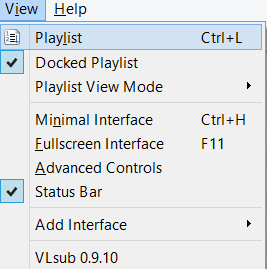
- After opening up VLC, click on View > Playlist [Shortcut: CTRL + L].
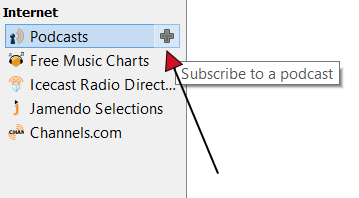
- On the left, under "Internet" you will find "Podcasts".
- When you hover over "Podcasts" a "+" sign will show up, click on it.
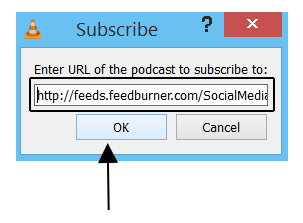
- Enter the RSS feed URL in the dialog that opens. Hit "OK" when you are done.
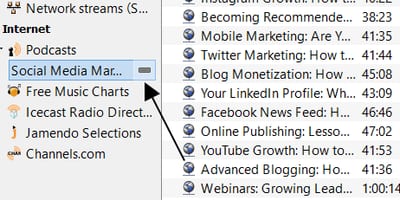
- A new podcast will be added below. To remove it just hover and click the "-" sign.
How to Find Podcast Feed URL
To subscribe to Podcasts, you need a direct feed URL. Such links are provided by the podcasters themselves. They are RSS feeds for podcasts. Check out their official websites or show notes pages to get the feed URL. You can also ask the podcasters and they will be happy to provide you their subscriber feed.For example: For subscribing to Social Media Marketing Podcast, you’d have to visit their official website socialmediaexaminer.com. If you open any one of the show notes blog post, you will find that they share the link to subscribe via iTunes, RSS and other providers.
Choose the feed that says RSS and click on it to get its link. For this podcast, the link is http://feeds.feedburner.com/SocialMediaMarketingFeed. As you can see, they have burned their feed using the popular feed burning service by Google’s feedburner. Copy this URL, and on VLC after you hit the + sign in podcasts, paste it and click OK.
<img src=“/images/2015/01/playing-a-podcast-vlc.png” alt=“playing-a-podcast-vlc” / loading=“lazy” decoding=“async”>
After a few moments, all their released episodes are listed there under Podcast > Social Media Marketing. Double click on any one of those episodes and they begin streaming to VLC. You can control the audio like any other audio or music you play using this awesome player.
Why can't I get Libsyn podcasts to work via their atom rss feed?
If you simply use a feed like http:// yourpodcast . libsyn . com / rss, it works. For example: http://thetraumatherapistpodcast.libsyn.com/rss
Is there an option or command to refresh a podcast listing from within the app? I don't seem to be able to find this through the interface and currently I'm using a workaround of having Feedly notify me when new podcasts are available for my "must listen" shows and then I have to reopen VLC to get the newly listed item.
Clearly this question of how to update or refresh a podcast was not answered here since it is 3yrs later and I have the same unanswered question. I get all of the backlog, but what I want is to see the new podcasts as they arrive (w/o having to resubscribe everyday)
I'm using VLC 3.0.8 and I don't know exactly when Podcasts' content are fetched, but when VLC is opened, the list of audios is refreshed. Example viewing a podcast at different days: https://imgur.com/V3WFiyA https://imgur.com/sjyUiqE
As soon as I close VLC player all of my subscriptions disappear. :-( how do I save them so they are there every time I open it?
Disappearing podcasts seems to be a problem till date.
They don't show until you click on Podcast under the Internet, it took me a long time playing to find this out.
Thank you!!!
Yes, thank you
What is so terrible about this system is that after you add all the RSS feeds you want there is no way to save them. You have to have the RSS URL handy with you every time you load the VLC player and add them again... and again, and again... Why?!?!?! Just Why?!?!
Yes, they somehow disappear.
Hmm, now I've added a podcast, closed VLC and after opening VLC again, when I click on the Podcasts item in Playlist view the podcast is still there. I don't know if VLC shows notifications when there is new content though, maybe using a RSS reader is a better approach (?). P.S.: Okay, now I see this thread: https://3.80.182.104/how-subscribe-podcasts-vlc-media-player/#comment-2415
Just started to use VLC for radio podcasts and find some BBC RSS feeds do not work while others do (there is no problem with iTunes or Winamp). It seems that the problematic feeds start the final address fieild with p as in http://podcasts.files.bbci.co.uk/p02pc9pj.rss. I am running the full desktop version of VLC on Windows 10. The problem exists with both the old 32version (v2.3.something I think) and the 64bit v3.0.1
I am having a similar problem except the link will work for awhile and then it stops working.
VLC saves the podcasts I've subscribed to. However, there is no way to arrange the podcasts. They just show up in whatever order I added them. It would be nice to be able to click and drag my favorite podcasts to the top.
Wouldn't it be better if you were able to search for podcasts like you do in Google music and others?
It would be. Definitely.
On Android??
There isn't such a feature out yet.
It works on android too
Using VLC to grab podcasts is fine, BUT there's no timedate displayed for any of the files. Not very useful. Is there a way to fix this ?
Pretty! This has been a really wonderful post. Many thanks for providing these details.