Using VLC Media Player, you are able to instantly convert 3D Half Side-by-Side (HSBS) movies to 2D; to watch in your 2D screen like your laptop or PC monitor. The method is quick and simple. All you do is crop the movie in half, so that you only get one side of the video. If you were watching it in a 3D screen, then you’d be overlapping these two sides.
After cropping, you get a square like resolution which you must stretch in order to fill up your screen. This way you’ll be watching a video in its original 16:9 ratio in 1080p or 720p format. The tools and effects that VLC provide like cropping and stretching are used. Applying these effects do not take time. It happens in real time as you play your 3D video on a 2D screen.
For converting HSBS 3d to 2D video format in VLC for watching in a 2D screen, follow these simple steps:
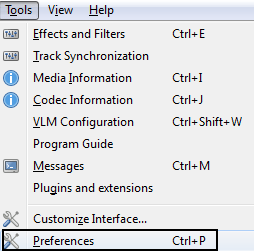
- In VLC Media Player, when nothing is opened go to Tools > Preferences [CTRL + P].
- Click on Video.
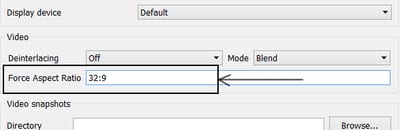
- Under Video, you will find "Forced Aspect Ratio". Set it to 32:9 and hit Save.
- Open up your 3D HSBS movie and pause it.
- Click on Tools > Effects and Filters [CTRL + E].
- Click on "Video Effects" and choose the "Crop" tab.
- Either on the left or right, input 960 px.
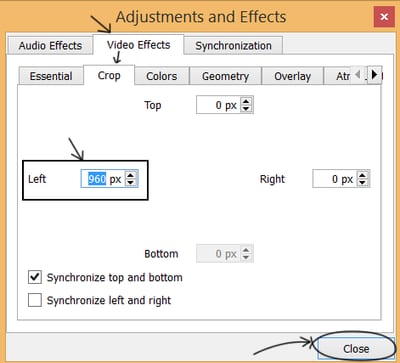
- Press "Close" and you are done.
- About Cropping: The value 960 px is half of the video's original width which is 1920 for a 1920X1080 (true 1080p) video. You can get the video resolution (WXH), by hitting CTRL + J in VLC Media Player. If it was a 720p (720X1280) 3D video, you'd be entering half of 1280 i.e. 640px.
- About Forced Aspect Ratio: This ratio is obtained by - Double of your video's original width:Video's original height. Set it to blank to watch normal 2D videos.
THANK YOU VERY MUCH...super cereal, this hint was most appreciated by someone
soooper!!thank u veru very much.It had helped me very much.Really u should be appritiated by some one:-}
you are very clever
good!
Thanks! How do I save this though?
It is not for saving; just for watching.
Can i do the same with vlc for Android?
I do not think it's possible in Android.
thanks. you're cool
But that doesn't solve its coloring effect!!
sorry it does..thanx
Wow oh wow. I' e been trying so many other tricks with no avail. This is so precious information. Thank you.
Thank you, this has been very useful. Can this be done with Under/Over 3D Images ?
how can I save the 2d version to a file?
You cannot. It is just for viewing.
Thanks for the info...In my case, adjusting the value to 640 exactly crops out the other part...
I just used this to watch a top/bottom 3D-just use the height setting to get the forced aspect ratio and crop numbers. Awesome tutorial. TYVM!
thank you so much for valuable tip
how to fix on mac ?
Follow the same steps. It might be slightly different but it should work.
Hi. just found this wonderful article. have been trying and successful, but not the subtitle. There is still side by side text. Can you help me? Would be great if only one subtitle appears on the middle. Thanks
If your subtitle is hardcoded to the movie then it will appear that way.
Thx non of the other settings worked :)
Thanks bro! :)
awesome bro thank you
THANKS!!!! Left me with a fixed video i thought was broken
Great article, displays 3d movie perfectly in 2d now. However the subtitles are display duplicated. Same subtitle displayed on left and right sides. Can they be limited to 1 subtitle? I don't see an option to crop subtitles. This movie has .idx and .sub files
I think there is one mistake from the article above. Correct me if I'm wrong thought. In the sentence: " ... If it was a 720p (720X1280) 3D video, you’d be entering half of 1280 i.e. 640px." Maybe the end of this sentence should be half of 720p, that is 360p. I'm trying to figure and test on my own, hope it's benefit for all the readers.
720 in 720p refers to the vertical resolution. The horizontal resolution is 1280 ( (720 / 9) * 16 ) for a 16x9 image. HSBS stands for Half Side By Side meaning that the frame for each eye is encoded in the left and right half of the frame. So, in the case of a 16x9 720p HSBS you crop out half of the 1280 horizontal resolution ( 640px ), then stretch the remaining half to the full width again. This is essentially what a 3D decoder does, except that instead of throwing away the unused frame, it will send it to the proper eye. For example, with active LCD shutter glasses, the decoder alternates displaying the left and right frames in sync with the operation of the shutters in the glasses. For what it's worth, some 3d videos are encoded HTAB (half top and bottom) in which case this trick would not work (without some modifications). If your video is HTAB, you would have to crop 360 ( half of 720 ) from the top or bottom, and force the aspect ratio to 16x18.
i tried it using a SBS video but all i got was a thin line as the video.
Try changing the pixel values.
i did what it says but it didn't save it so when i opened the video it was still an SBS video.
Thanks a ton!
very useful information...thank's alot.
Thank you so much. I was just deleting the file as it was of no use. Great and very simple hint.
Thanks. I knew it was possible as soon as I found crop in the menu, but it would have taken me at least an hour fiddling with moving parts to get it working. You did save me a bunch of time!
This doesnt work on mac! i downloaded vlc but cannot force an aspect ratio or crop the video to my liking! (there are only preset options) please help!
Yes you are right. The developers were never as interested in Mac users. Yes it really sucks that they never updated vlc for Mac. There are far more controls and options for Microsoft.
I'll check again with current version, but if this is the case, the solution is to create a virtual machine with VirtualBox or whatever, install Windows in that and do the conversion there. I find it's convenient to have a Win7 and Win10 VM around for things like this (and for video games, and whatever).
Thanks a lot!
For VLC 3.0.3, there's no "Force aspect ..." in the Video section. Put 32:9 in the "Custom aspect ratios list". Later, when you play your 3D video, select that aspect ratio under Video | Aspect Ratio and go to Tools | Effects and Filters | Video Effects | Crop, check "Synchronize top and bottom", and enter your horizontal resolution in the "Left" box (Use 1920 for 1080p and 1280 for 720p). Whew ^_~.
Saved my 1.5gb bandwidth and time. Thanks.
thankx bro,
Thanks!
I wish VLC had options like what PotPlayer has, you just chose an option to view 3D in 2D.
thanks you saved 10GB bandwidth <3
How to watch 3d video on Android tv with help of vlc player?
The app on Android TV wouldn't have these features. But can you open the 3D HSBS video and hit the 3D button on the remote to watch it?
wow thank you i tried and it works!
that didn.t save the video so it would be a single video meaning it wouldn't still be a SBS video when you open it up again.
If you just want to watch it, turn on interactive zoom under effects and filters/video effects/Geometry, and zero in on one side, enjoy.