If you want to get subtitles automatically for movies in VLC Media Player, then you can simply do it with the help of a VLC add-on called VLSub. It is the highest rated add-on for the player due to its usefulness. Once you download and install the simple plugin, it will automatically search for subtitles for the current movie that is being played. So, make sure you are connected to the internet. It displays a list of choices that it has found and you can choose the correct one for your video.
What this VLC subtitle plugin does is that, once installed, it adds a new menu as View > VLSub. Click on the new menu item, specify the search criteria—search by hash or search by name—and the results will show. It scours popular subtitle provider websites based on the search criteria. Pick the best matching result for your video and the subtitles will be loaded. You will need VLC 2.2.* or VLC 3 for it to work.
Install the plugin, access it and search. It is as easy as that. No more manually downloading, browsing and loading subtitles for each and every movie that you play. Everything is handled by the software.
Here are the detailed steps for you to get subtitles automatically for movies in VLC Media Player:
- Download the plugin from here.
- Extract the contents of the zip file.
- From the extracts, browse and find the lua file; move it to your /lua/extensions/ folder.
The extensions folder for different OS are as follows:
- Windows: C:\Program Files\VideoLAN\VLC\lua\extensions\
- Linux: /usr/lib/vlc/lua/extensions/
- MAC OS X: /Users/<your_name>/Library/Application Support/org.videolan.vlc/lua/extensions/
- Restart or open VLC Media Player.
- Access View > VLsub.
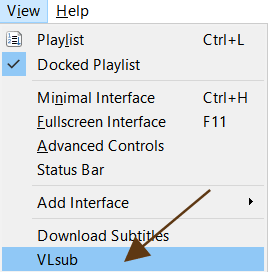 VLsub" loading="lazy" decoding="async">
 - Click on Search by name after confirming the movie title. Change it if you have to.
- Highlight the correct subtitle and click on Download selection.
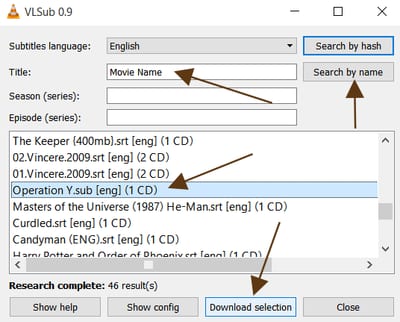
If you have problems in installing VLSub: Learn How to Install a VLC Media Player Addon .lua extension
If you want another option/plugin instead of VLSub, try: Subtitles finder.
In VLC For Android
If you use VLC in your smartphone, then know that it doesn't require any special add on to load subtitles. There's a built in feature for that. After you load a movie, press the Audio tracks and subtitle button (the second button from the left on the interface itself). After that tap on the Download subtitles option. The Android app will automatically search for the subtitle and load it on your device's screen.All the details for the Android app: Downloading Subtitles Automatically or Manually in VLC for Android
<img src=“/images/2016/01/download-subtitles-app.png” alt=“Download Subtitles in App” title=“Download Subtitles in App” / loading=“lazy” decoding=“async”>
For options in the Android app related to the subtitles, go to Settings from the hamburger menu. Scroll down to Extra settings where you will find the Subtitles option. Tap on it and you can choose the attributes for it (size, color, background) along with auto loading. An important option here if you are downloading subtitles is the Subtitles download language. Under it, you can choose the various languages that you want your VLC app to download the movie dialogues in.
Hello, I have a problem with multiple subtitle support. I'm a polylingual person and would like to watch movies with several subtitles simultaneously. Whenever I try to switch subtitles by pressing the hotkey 'v', it won't show the subtitle in another language until after it goes further to the next frame. How can I solve that problem? All I need is just push the hotkey "v" to toggle between subtitle tracks of a certain frame. I would be really glad if you could help me with this issue. I'm looking forward to hearing good news from you soon. Best wishes
The only way I see possible is to hard code one subtitle and then load the other one externally. Position them so that they do not overlap.
I also am trying to find a program that can display 2 subtitles at once on Linux. On Windows , BS.Player can do that, but I don't want to install Windows just to use BS.Player. I'm getting to the point to consider developing my own front-end using VLC as backend.
works perfectly..thanxx man
Hello, does this add-on exist for Android as well? I'm trying to watch streaming on ShowBox but it says it cannot find the subtitles, even though they have been selected on ShowBox. Please help! Thank you!
I don't think the Android VLC player has addons.
VLC does not find subtitle files online when searching by hash if media file is bigger than 2gb which is most 1080p movies these days
explain again because i tried it and it did not work if i may ask is it with bollywood movies
It doesn't support every movie that is out there.
Does it support the documentary movie from BBC?
I doubt it but you can give it a try.
did it on mac os, can't see the new menu under VIEW
i tried to do it but i think i did something wrong. anyone willing to help me???
It goes crash when doing search.
Use the other plugin:, Subtitles finder.
this crashes my vlc. i tried by hash and file name. either way after clicking 'search by {hash or filename}' it freezes then 30s later says the plug in is not responding, and when I close it closes the whole program. when I open again it asks if I want to send a bug report, if I say yes, after about 30s it says error communicating with ftp server. It's weird because the auto subtitles work on my android tablet vlc, same video files, same source (NAS)
same problem with me also
If it looks like it freezes, just wait like 2-3 minutes. It will finish downloading the subtitle file and you'll get the sub track. Works great so far - thanks.
Thanks it is working for me
Thanks it really help for movie with more than a language, the subtitle help to assist to understand what is been said.
Each time i try to add a sub I get the following error Error Code "401 Unauthorized" (200). Please assist. Thank you
Thanks Dude ;) it's working awesome
I faced the same problem that many have reported over here - the VLSub "extension" would hang while trying to calculate the hash or fetch the subtitles. And if I tried to close it, it'd crash all of VLC with it. Not a single subtitle ever it found. And it's not like it had not worked in the past. In fact, it had worked quite well. So I started searching for a stable alternative to this unreliable PoS. I found two - OpenSubDownloader and TSubtitleDownloader. The former failed to work but the latter worked wonderfully. OSD incidentally was a Canonical product primarily written for their flagship Ubuntu Linux product, which they'd kindly ported over to Windows. Sadly, due to the various updates in Ubuntu, this package was now abandoned and languishing since 2013. Hence, non-functional. TSD, however, proved to be the dark horse. It downloaded all the correct subtitles for SuperNatural Season 11 which I had been seeking, without any fuss. The URL given in it's "About" dialog is https://sourceforge.net/projects/tsubtitledownloader/ but sadly, it no longer exists at that URL what with GitHub changing hands and now a private entity. I guess you'll just have to search for it's download package. In case, nobody is able to find a reliable install package of TSD for downloading, then please let me know in the comments. I'll share my file although I don't want to appear as if I'm a professional software pirate or something. Just trying to help the community here.
hello! would like to get the TSD file if it's not that much of a bother! thank you so much!
Thank you very much..!!
i install the vlc 2.2 after installing when i try to download the english subtitle it crash it .... i dont know what to do
Try it after Updating VLC to the latest version.
It crashed at first. But clicking the box above first - Download Subtitles, automatically displayed the list of subtitles. then easy to choose and download. Small bug?
It worked like MAGIC...THANKS!
how did u do it...am having a hard time
it shows that you can search for shows but nothing comes up why is that? it would have been awesome if it did
It works for some shows and movies and for some it doesn't. Try the next plugin called Subtitle finder.
It worked great, thanks !
VLC can watch video online and subtitles online ? ex: link video https://example.com/example.mp4 link subtitles https://example.com/example.srt
It cannot add the subtitles from online links.
Its a magic It worked perfectly
I can't find any /lua/extensions folder
You can try making it.
Where's the part that makes it automatic? You have to manually do this every time you open a video file...
Good thought. By automatic, we meant that we don't have to manually open up subtitle websites and download it. VLSUB does it automatically for us.
I can't find the file
by 'automatic' they meant 'not automatic'. It's a fine distinction, only the keen eye will notice it.
the automatic part is in the clickbait title... they are aware that it should be called "simplified sub download", but they go with automatic anyway.
Does this method work if we play HFR and 4K videos ?
thanks it's working
where does vlc get the subs from? opensubtitles? other substitles websites?
Yep! but in greece is banned due to Infringement of Intellectual Property. So, i cannot dl subtitles :- (
Honestly I'm having a hard time trying to do that on my window 11
It doesn't download subtitles because opensubtitles.org is now banned in Greece. Can i change the site in config somehow?