While we are watching a movie, a series or some other video in VLC Media Player, we tend to turn subtitles on. Subtitles helps us greatly to understand some part of the story or even an entire movie if it is in some language that we do not understand. VLC allows us to open up external subtitles and use it for our current video.
Some movies come with embedded subtitle files while others require you to download subtitles from an external source. You might also be provided an external subtitle file with a movie but it might not be embedded within the movie. Subtitle files are generally in .srt format but there exists other formats. Like most video formats, most subtitle formats with different extensions are supported in VLC Media Player.
To Open Up an External Subtitle:
Method 1
- Open up your video and make sure it begins playing.
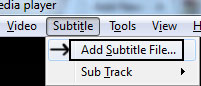
- From VLC the menu bar, click on Subtitle > Add Subtitle File
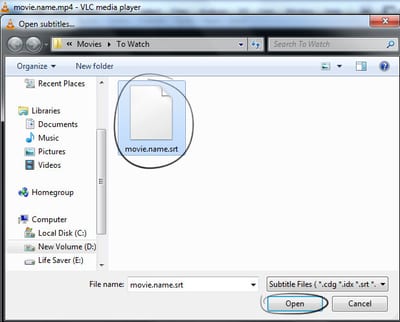
- Browse to the location where you subtitle file is present and hit open
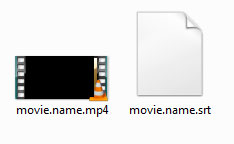
- Put your movie file and subtitle file in the same folder.
- Give both those files the same file name. Only the extension will be different.
- For example:
The Movie file => Movie.name.mp4
The Subtitle file => Movie.name.srt
 For multiple subtitles for more than one languages use the format movie.name.lang.srt (example: movie.name.en.srt or movie.name.ru.srt)
 - Open up the movie file and the subtitle will load automatically from the beginning.
External Subtitle Formats Supported by VLC Media Player
VLC Media Media player supports tons of subtitle formats. The following list of external subtitle extensions (formats) is supported by VLC Media Player:- *.aqt (AQTitle)
- *.cvd (Chaoji VCD)
- *.dks (DKS)
- *.jss (JACOSub)
- *.sub (MicroDVD/MPSub/SubViewer/VOBSub)
- *.ttxt (MPEG-4 Timed Text)
- *.mpl (ML2)
- *.txt (ML2/VPlayer)
- *.pjs (Phoenix Subtitle)
- *.psb (PowerDivX)
- *.rt (RealText/Smil)
- *.smi (SAMI)
- *.ssf (Structured Subtitle FOrmat)
- *.srt (SubRip)
- *.ssa (Sub Station Alpha)
- *.svcd (Super Video CD)
- *.usf (Universal Subtitle)
- *.idx (VOBSub)
I have a dunno , which video players ? can use something like name.mkv / name.mp4 name_lang.aac / name_lang.mp3 name_lang.ass / name_lang.srt For the video player shows the "lang" file for external audio(s) (likely various langs) and the same for external subtitle(s) (likely various langs too) You can understand i say ??? This is very useful for me , because i ever had the three 3 sepatared , its better for my , thank you for readme.
If you have multiple subtitles in multiple languages for just one video, then you can use them. The underscore ( _ ) method that you've mentioned works as well, but the standard method is: name.mkv / name.srt / name.lang.srt (The lang can be anything like en.srt ru.srt)
Tried to load USF subtitle in VLC Portable 2.1.3 Rincewind with this result -- logger module started -- main error: no suitable demux module for `file/subtitle:///D:/USF.usf' The subs render well in The Core Media Player (you can see even the pictures) and only the text in MPC-HC. The USF sample is http://web.archive.org/web/20060329002811/http://usf.corecodec.org/files/usf-specs.zip, which includes the pictures. Am I missing anything?
Yes CDLVCDLV , you are missing , i asked , which video players can support , load multiple Audio Files and / or , Multiple Subtitles , for 1 file Video ( Just Images without audio ) For example 1 file with 3 languages for example something Video.webm --> Video without Audio Video_es.aac --> Audio for video in spanish Video_en.mp3 --> Audio for video in english Video_ru.ogg --> Audio for video un Russian Video_es.saa --> Subtitle for video in spanish with Styles Video_es.ass --> Subtitle for video in spanish with Styles Video_es.srt --> Simple Subtitle for video in spanish Video_en.srt --> Simple Subtitle for video in english Video_rus.ass --> Advacce Subtitle for video in Russian You understand me ??? i expect someone understand , becuase my english is bad XD
i ran into a different problem with Chinese subtitle. I has the SRT file (in UTF-8 encoding) and MP4 file in the same folder and same name. VLC did pick up the SRT file and tried to display the strings. However, the displayed characters are all in hollow squares. This indicates VLC can only handle ANSI characters. Any solution?
How do you load external subtitles on the android version of VLC ?
This tutorial might help you to load external subtitles in VLC for Android.
I am casting to tv, from my android phone (using VLC for android). The moovie is on a cloud drive (pCloud drive) . How could I possibly load the subtitles ? (VLC ignors them even if they are on the same folder, and have the same name on the cloud drive)
Yeah, I don't think that VLC will go into your cloud drive and look for subtitles with the same name. That only works on the local drive. So, what you can do is load the subtitle manually in VLC Android.
No subtitles with VLC Blu-Ray add-on Also no Menu items I use the Pull downs to get to the movie